|

There are already a number of tools available for metadata tagging, but few of them are effective and complete. And none of them offers integrated vocabulary solution, although it is often argued by experts in the field of metadata that it is essential for metadata tools to integrate controlled vocabularies with metadata tagging. As Murtha Baca from the Getty puts it, “Choosing the most appropriate metadata standard or standards for describing particular collections or materials is only the first step in building an effective, usable information resource. Unless the metadata elements or data structure are populated with the appropriate data values (terminology), the resource will be ineffectual and users won’t be able to find what they are looking for, even it is actually there.” MetaChoir not only provides a complete and sophisticated metadata solution, but also tightly integrates controlled vocabularies into metadata tagging with WebChoir’s own vocabulary tools.
Among many others, MetaIndexer's Key features include:
Open Architecture
MetaChoir is based completely on a fully integrated Web-based architecture that enables metadata created by MetaIndexer to be accessed, updated and searched regardless of physical location or type of computer used. Its open architecture allows you to use any platform, including UNIX, NT or Linux; any Web server, including Apache, Netscape Enterprise server, and IIS; and any client, including PC and Macintosh. As a result, you can easily set up MetaIndexer without investing in additional hardware and software, no matter what kind of platform and environment you may have.
Superior Standards Support
MetaIndexer supports most popular metadata standards, including Dublin Core, METS, MODS, and VRA Core. And it lets you easily add the metadata standards that have not been provided by MetaIndexer, or create your own metadata templates.
Flexible Database Support
MetaIndexer supports most popular databases, including Oracle, Sybase, DB2, Microsoft SQL Server, and MySQL. Thus, it is very likely that your standardized DBMS in your organization is supported by MetaIndexer. And thereby you can deploy MetaIndexer without extra investment in databases.
Complete Data Type Support
MetaIndexer lets you tag almost any Web objects, including HTML page, XML page, image, video/audio, PDF, MS Office documents, and database records. As a result, most, if not all, of your data can be made accessible to your users.
Total Controlled Vocabulary Integration
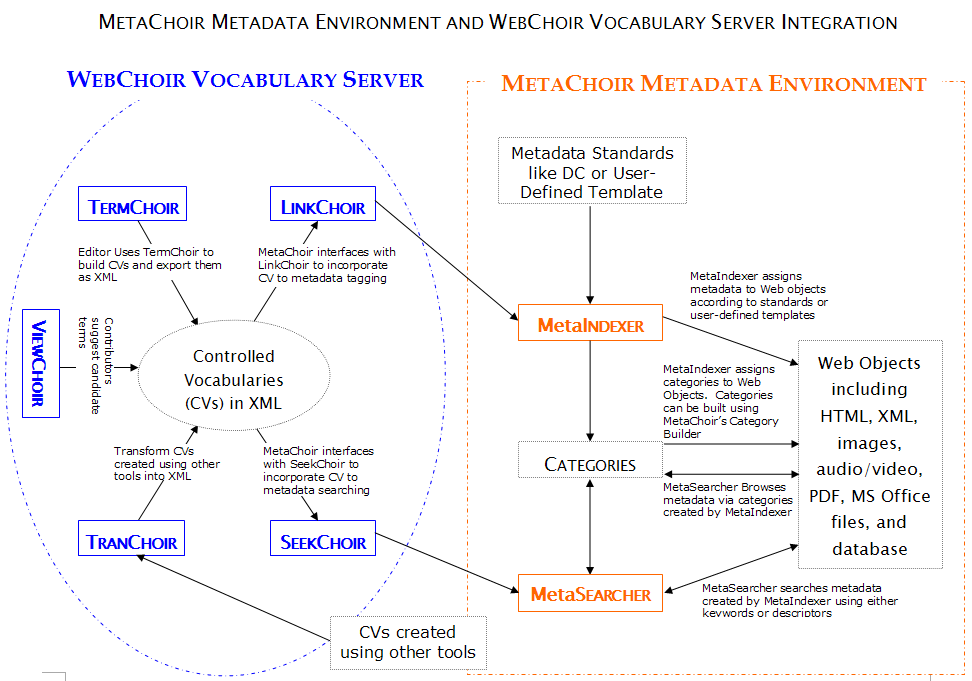
MetaIndexer enables the integration of all WebChoir vocabulary tools into metadata tagging, from vocabulary building to vocabulary indexing and to vocabulary searching. With the integration of WebChoir vocabulary tools, the user can easily populate metadata elements with controlled vocabularies, as illustrated in the MetaChoir and Vocabulary Server Integration Diagram. The vocabulary integration has been regarded by many as crucial for metadata tagging and information access.
Superb Multi-lingual Support
MetaIndexer offers complete multi-lingual support so that you can tag your information recourses in almost any language. Multi-lingual Support is particularly important for tagging information on the Web.
Powerful Reporting Capabilities
MetaIndexer enable you to create a variety of reports for all your metadata tagging needs. And you can easily specify the data elements to be included in the report, the ordering of the data elements, and the font and styles of the different data elements.
Unparalleled Metadata Transformation
MetaIndexer provides a number of ways for you to transform your metadata. First, MetaIndexer enables you to convert your existing proprietary metadata into Dublin Core and other standards easily. Second, MetaIndexer allows you to export your metadata into HTML, XML and RDF documents. As a result, you can fully utilize your data by re-purposing it or exchange it with others.
Automatic Tagging
MetaIndexer can automatically tag the pages by mapping keywords in the page/record with selected controlled vocabularies. You can then either directly use the metadata generated automatically or edit it to make it more accurate and effective.
Effective and Easy-to-use Interface
MetaIndexer provides an integrated display of your website that allows you to navigate your website easily by using an expandable/collapsible tree and to view the content of a page in the tree simultaneously. As the user navigates the tree, he always knows where a particular page is in the tree and what information it contains at the same time. And he can easily perform actions on the selected page by clicking a command button at any time.
Extraordinary Tagging and Editing Capabilities
MetaIndexer offers extraordinary tagging capability that allows the user to assign metadata to a page easily and quickly. Among many others, MetaIndexer offers the following editing capabilities:
MetaIndexer allows you to create as many as collections as you desire. A collection can be either a static website or a database.
MetaIndexer allows you to define as many as templates as you desire, in addition to the standard metadata templates provided by MetaIndexer. And you can designate any metadata element to be controlled by authorities and assign a lookup table or controlled vocabularies for it.
MetaIndexer supports four types of access levels: Super editor, Power editor, Standard editor, and Read-only. With the multi-level User-based permissions, you can control the information accessibility at all levels to safeguard your valuable data, meanwhile giving you the flexibility.
MetaIndexer provides a variety of system and personal options for system administrators and users to configure MetaIndexer to meets their specific needs.
MetaIndexer enables you to build a faceted taxonomy or categories, assign Web pages or other objects to these categories, and find what you are looking for by browsing the faceted categories.
MetaIndexer enables you to navigate a browsable vocabulary hierarchy to view pages or records described by a particular descriptor.
MetaIndexer allows you to view logs that record all transactions by the user. You can qualify the log with many filters and sort the result by a number of fields dynamically.
 Top of page Top of page
|